


We collect and integrate data from pharmacies, mass market, and hospitals, supported by the largest pharmacy panel in the market, full mass market coverage, and robust hospital coverage. This unique dataset enables the transformation of information into actionable intelligence, empowering strategic decision-making, uncovering growth opportunities, and anticipating market trends on a global scale.
Intelligence for life
Intelligence for life
We go far beyond data, insights, knowledge, and technology.
We bring intelligence. We bring life.
Intelligence for life
When technology amplifies human thinking, intelligence becomes life.
Pharmacy Market Watch
Monthly Report
Turning data into strategic decisions
By combining the best data, advanced analytics, and deep market knowledge, informed decisions are enabled, with a real impact on performance and innovation in the healthcare sector.
Continuous deepening of healthcare ecosystem understanding
Ongoing evolution and increasing proximity to different stakeholders enhance the ability to deliver an increasingly integrated and relevant market perspective.
Proximity that drives actionable insight
The strengths of our connection to the healthcare ecosystem and key decision-makers enables us to deeply understand real-world challenges and translate them into practical, action-oriented recommendations, backed by an experienced consulting team and leading market expertise.
Human intelligence enhanced by technology
We combine the most advanced tech tools to transform fast, complex information into clear, differentiated, and future-oriented solutions.
Services
& Solutions
From advanced data integration to strategic consulting and cutting-edge technology, our services are built to support healthcare transformation. We combine intelligence, innovation, and expertise to help clients anticipate challenges and seize new opportunities.
HMR data
| Pharmacy | Mass Market | Hospital | Patient Dynamics |
|---|---|---|---|
| Coverage: 2650 pharmacies; 91% of the Portuguese pharmacy universe | Coverage: 100% of mass market retail channels | Coverage: comprehensive NHS hospital panel | Coverage: comprehensive NHS hospital and retail panel |
| Monitoring: daily insights from segment to pack/ATC/HMR Class. Competitive customized market |
Monitoring: mass market + pharmacy for Consumer Health sales | Monitoring: monthly insights from segment to pack/ATC/INN. Competitive customized specialties |
Monitoring: patient profiles, pathways and hospital flows |
| Views: 418 regions and customized territories, pharmacy groups | Views: national and 10 regions customized territories | Views: national to customized regional coverage | Views: treatment patterns – adherence, switching, drop out |
| Dynamics: sales, sell-in, stocks, prescription, distributions | Dynamics: total Consumer Health segment sales in Portugal | Dynamics: Consumption performance and treatment switching patterns. Real patient data and prescribing dynamics | Dynamics: comprehensive, data-driven view of patient dynamics |
HMR PMR
To address each client’s strategic challenges, we have a fully integrated service that combines quantitative, qualitative, and hybrid methodologies, transforming data into actionable intelligence and delivering deeper insights to drive informed decision-making and sustainable growth
| Quantitative Research | Qualitative Research | Healthcare Fieldwork & Recruitment | Market Access & Healthcare Intelligence |
|---|---|---|---|
| Market measurement and performance tracking | In-depth insights into behaviours and decision drivers | Access to healthcare stakeholders | Insights to support access and market strategy |
| Segmentation, sizing and benchmarking | Exploratory and hypothesis-driven research | Recruitment across HCPs, patients and payers | Payer, reimbursement and pathway analysis |
| Evaluation of brand, concept and communication performance | Patient journey and experience research | Hard-to-reach audiences and validated samples | Healthcare system dynamics and channel intelligence |
HMR consulting
Because every challenge demands its own intelligence, we leverage deep industry expertise and market insight to design tailored, high-impact solutions, empowering smarter decision-making, accelerating performance, and delivering measurable, sustainable results for our clients.
| RWE & Outcomes | Pricing & Market Access | Product Strategy | Commercial Effectiveness |
|---|---|---|---|
| · RWE Setup · Disease Assessment – “Clinical Emersion” |
· Price strategy | · Portfolio Screening · Partnerships development |
· Resource Optimization · Segmentation: – Pharmacies – Institutions – Hospitals |
| · Patient Pathways · Patient Data – HCA & Patient Dynamics |
· Pharmacoeconomics | · Forecasting · Unfilled Rx · Digital Transformation |
· Territory Alignment · Incentive & Compensation |
| · Patient Management Programs · Medical Writing |
· Regulatory Impact Eval · Discount Benchmark |
· Supply Chain · Strategic Workshops · RX Switch |
· Products Performance Assessment · Campaigns Performance Analysis |
| · Advisory Boards | · Price Elasticity | · Co-Rx Assessment · Rx Dynamics · Basket Assessment |
· Products Performance Assessment · Campaigns Performance Analysis |
| · LoE price assessment | · LoE strategy |
HMR tech
HMR’s technological and innovation core, leveraging advanced platforms and artificial intelligence to drive the creation of impactful, value-driven solutions for the healthcare sector.
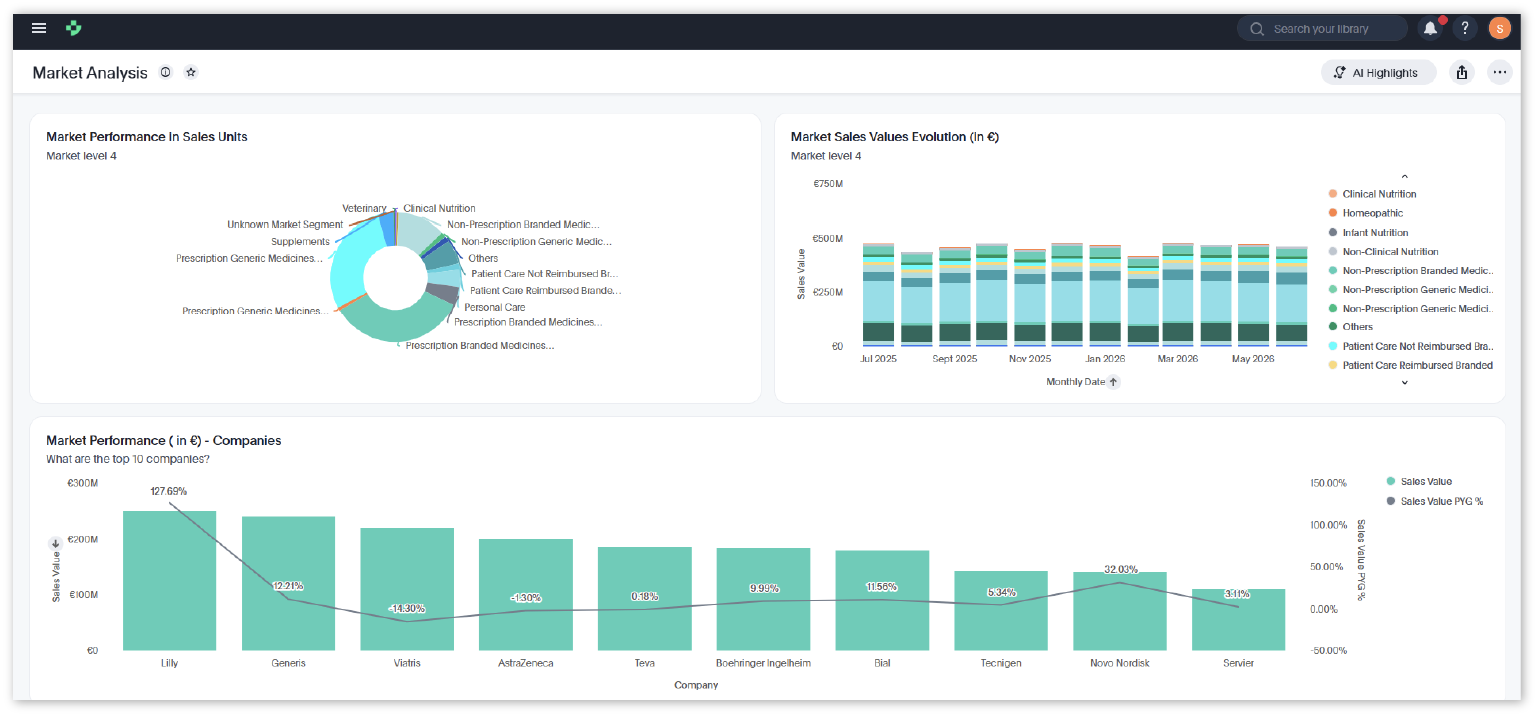
HAIA is HMR’s next-generation analytics platform, designed to transform how data is accessed, explored, and used by combining advanced platforms with artificial intelligence. It empowers every user to interact with data through a simple, intuitive search experience, delivering fast, scalable access to insights and enabling the creation of high-impact, value-driven solutions for the healthcare sector.
Services
& Solutions
From advanced data integration to strategic consulting and cutting-edge technology, our services are built to support healthcare transformation. We combine intelligence, innovation, and expertise to help clients anticipate challenges and seize new opportunities.
HMR data
We collect and integrate data from pharmacies, mass market, and hospitals, supported by the largest pharmacy panel in the market, full mass market coverage, and robust hospital coverage. This unique dataset enables the transformation of information into actionable intelligence, empowering strategic decision-making, uncovering growth opportunities, and anticipating market trends on a global scale.
Pharmacy
Coverage:
2650 pharmacies; 91% of the Portuguese pharmacy universe
Monitoring:
Daily insights from segment to pack/ATC/HMR Class. Competitive customized market
Views:
418 regions and customized territories, pharmacy groups
Dynamics:
Sales, sell-in, stocks, prescription, distributions
Mass Market
Coverage:
100% of mass market retail channels
Monitoring:
Mass market + pharmacy for Consumer Health sales
Views:
National and 10 regions customized territories
Dynamics:
Total Consumer Health segment sales in Portugal
Hospital
Coverage:
Comprehensive NHS hospital panel
Monitoring:
Monthly insights from segment to pack/ATC/INN. Competitive customized specialties
Views:
National to customized regional coverage
Dynamics:
Consumption performance and treatment switching patterns. Real patient data and prescribing dynamics
Patient Dynamics
Coverage:
Comprehensive NHS hospital and retail panel
Monitoring:
Patient profiles, pathways and hospital flows
Views:
Treatment patterns – adherence, switching, drop out
Dynamics:
Comprehensive, data-driven view of patient dynamics
HMR PMR
To address each client’s strategic challenges, we have a fully integrated service that combines quantitative, qualitative, and hybrid methodologies, transforming data into actionable intelligence and delivering deeper insights to drive informed decision-making and sustainable growth
Quantitative Research
Market measurement and performance tracking
Evaluation of brand, concept and communication performance
Segmentation, sizing and benchmarking
Qualitative Research
In-depth insights into behaviours and decision drivers
Patient journey and experience research
Exploratory and hypothesis-driven research
Healthcare Fieldwork & Recruitment
Access to healthcare stakeholders
Hard-to-reach audiences and validated samples
Recruitment across HCPs, patients and payers
Market Access & Healthcare Intelligence
Insights to support access and market strategy
Healthcare system dynamics and channel intelligence
Payer, reimbursement and pathway analysis
HMR consulting
Because every challenge demands its own intelligence, we leverage deep industry expertise and market insight to design tailored, high-impact solutions, empowering smarter decision-making, accelerating performance, and delivering measurable, sustainable results for our clients.
RWE & Outcomes
RWE Setup
Disease Assessment – “Clinical Emersion”
Disease Assessment – “Clinical Emersion”
Patient Pathways
Patient Data – HCA & Patient Dynamics
Patient Data – HCA & Patient Dynamics
Patient Management Programs
Medical Writing
Medical Writing
Advisory Boards
Pricing & Market Access
Price strategy
Pharmacoeconomics
Regulatory Impact Eval
Discount Benchmark
Discount Benchmark
Price Elasticity
LoE price assessment
Product Strategy
Portfolio Screening
Partnerships development
Partnerships development
Forecasting
Unfilled Rx
Digital Transformation
Unfilled Rx
Digital Transformation
Supply Chain
Strategic Workshops
RX Switch
Strategic Workshops
RX Switch
Co-Rx Assessment
Rx Dynamics
Basket Assessment
Rx Dynamics
Basket Assessment
LoE strategy
Commercial Effectiveness
Resource Optimization
Segmentation:
– Pharmacies
– Institutions
– Hospitals
Segmentation:
– Pharmacies
– Institutions
– Hospitals
Territory Alignment
Incentive & Compensation
Incentive & Compensation
Products Performance Assessment
Campaigns Performance Analysis
Campaigns Performance Analysis
Products Performance Assessment
Campaigns Performance Analysis
Campaigns Performance Analysis
HMR tech
HMR’s technological and innovation core, leveraging advanced platforms and artificial intelligence to drive the creation of impactful, value-driven solutions for the healthcare sector.
HAIA is HMR’s next-generation analytics platform, designed to transform how data is accessed, explored, and used by combining advanced platforms with artificial intelligence. It empowers every user to interact with data through a simple, intuitive search experience, delivering fast, scalable access to insights and enabling the creation of high-impact, value-driven solutions for the healthcare sector.
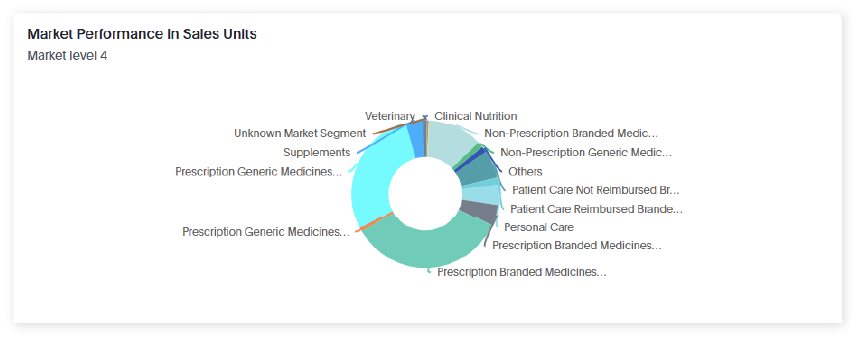
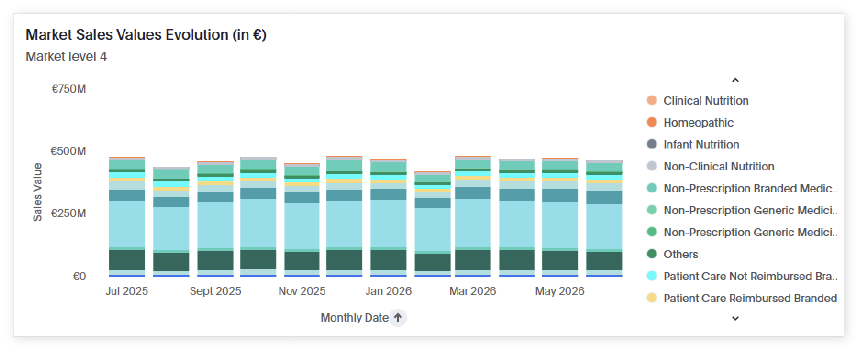
Pharmacy Market Watch
Our work is carried out through the in-depth research we perform on the challenges and dynamics of the health market of the country we are working in. Because, above anything else, we believe that sharing The Power of Knowledge is the most effective way of taking it even further.